
UserBase

Website Login System and User Manager

New!

About

UserBase is a login system for your website that's simple to install and requires very little configuration.  It runs on virtually any server because it is written in pure Perl and requires only MySQL support (or PostgreSQL, etc), both of which are available on the vast majority of webservers.

Contents

Live Demo
Screenshots
Features
Download
Purchase
Instructions: Apache on Mac/Linux/BSD
Instructions: Apache on Windows
Instructions: IIS on Windows
FAQ
Password-Protect Your Webpages
Password-Protect Whole Directories
Password-Protect CGI Scripts
Password-Protect Pages Without Using PHP
Support
ChangeLog

Screenshots

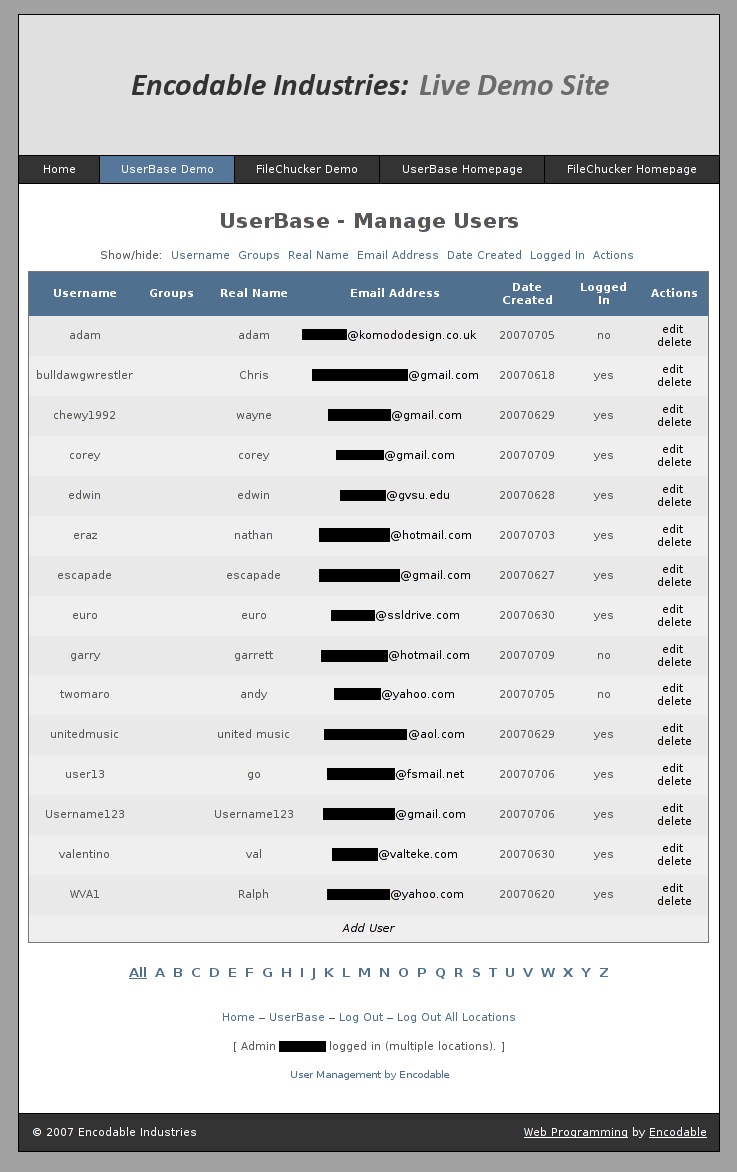
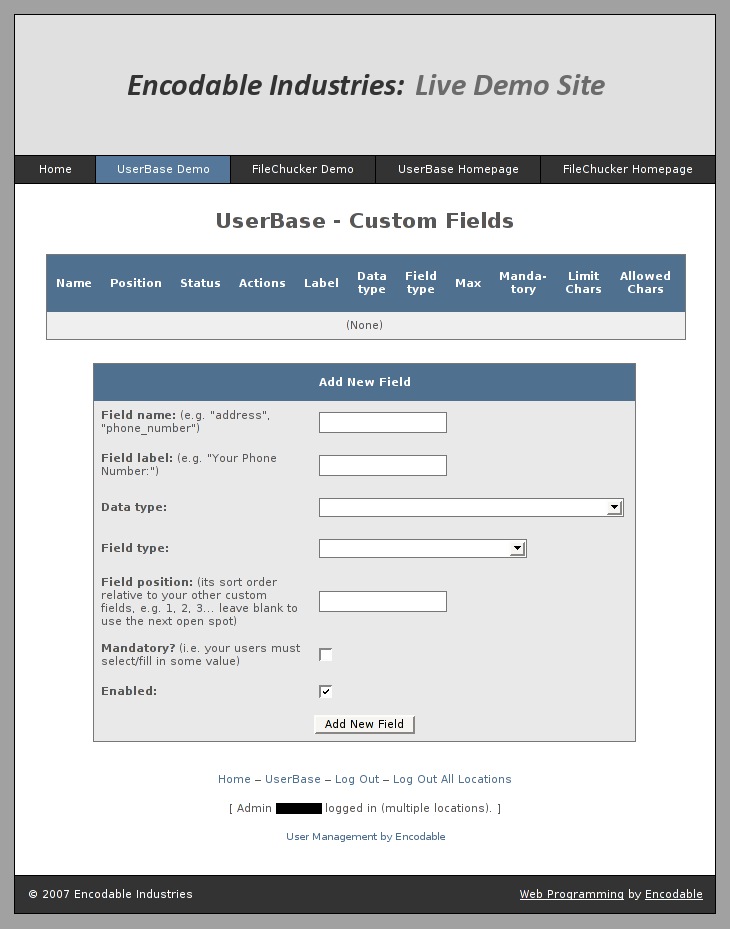
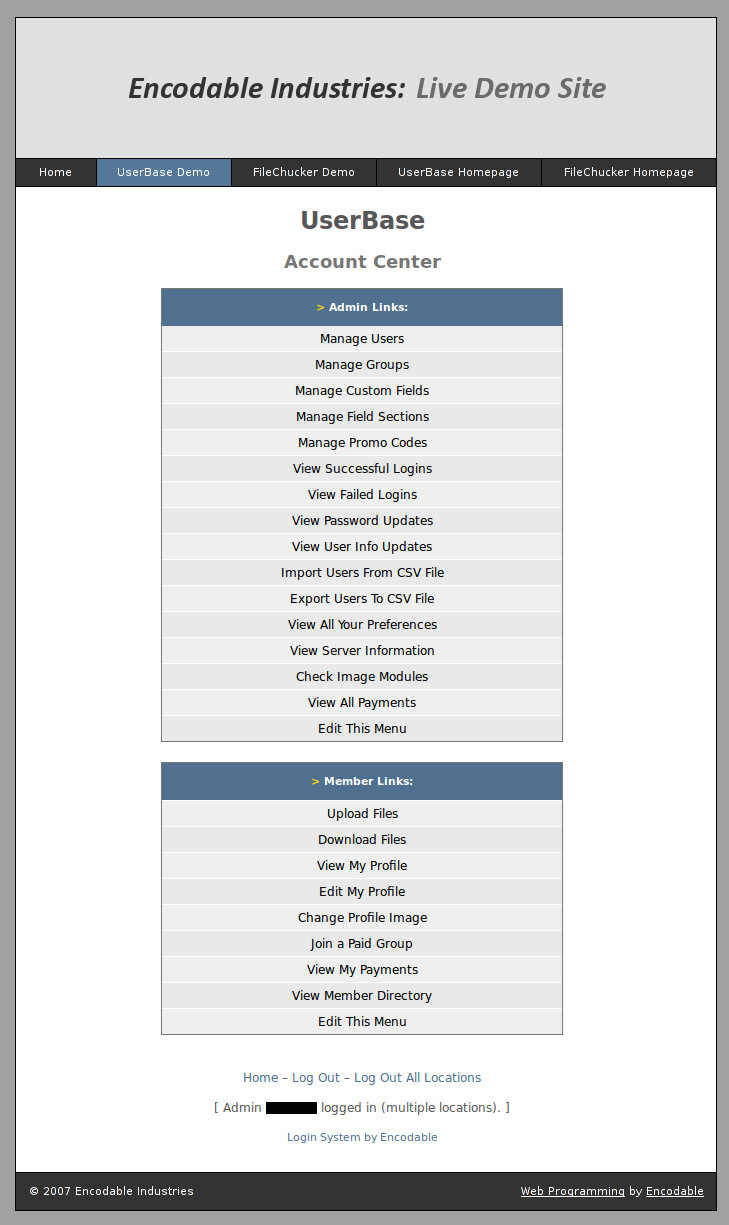
Here are a few screenshots of some of UserBase's admin-only pages:
Features

  • Simple installation, and easy integration into your website's existing layout
  • Create unlimited user accounts and unlimited groups
  • Can password-protect any PHP page or CGI script on your site (and any HTML file by changing its extension to php), as well as entire directories of files
  • Supports optional paid accounts with simple PayPal-based configuration and multiple payment levels
  • Full control over account creation: administrators can add/delete accounts; public sign-up can be enabled; public sign-ups can be set to require admin approval and/or email verification before becoming active
  • User registration / signup page is customizable with unlimited form fields, to collect whatever user information is appropriate for your site
  • Users can change their own passwords, and reset them via email if forgotten, without the need for the webmaster's intervention
  • Login sessions can be restricted to user's current IP address for increased security
  • Can automatically lock accounts after a number of failed logins
  • Can automatically timeout an idle session after a period of inactivity
  • Can be configured to prevent or allow multiple simultaneous logins by the same username
  • Can sleep for a specified number of seconds on failed logins for protection against brute-force attacks
  • Salts passwords and never stores any plaintext passwords; only stores salted encrypted versions
  • Customizable landing page so when a user logs in, he immediately see links to the member-only and/or admin-only resources that you specify
  • Optional automatic redirection to pages you specify after login/logout
  • Supports both HTTP and HTTPS, for sites that have SSL encryption certificates
  • Works on virtually any server (known to work on Apache, IIS, Windows, Linux, and OS X Server) and any client (tested in Mozilla/Firefox, Opera, Internet Explorer, and Safari)
  • Tons more; see the FAQ and the userbase_prefs.cgi file in the trial version for details.

Download

You can download the UserBase trial version and install it on your site right now; it includes instructions.  The trial is designed for you to test on your server before purchasing the full version.  As such, it has limitations and disabled features, including 4-character length limits on usernames and passwords, no "remember me" login option, no password reset feature, and more.

Purchase

To get the full version of UserBase, please use the buttons below.  The 3- and 10-site licenses are for when you want to install UserBase on multiple different websites, and they include big discounts!  (Those numbers do not refer to the number of user accounts that you can set up; that is unlimited.)  All licenses are lifetime licenses: you pay only once, and it's yours forever.  And all licenses include free tech support, free upgrades for 1 year, and discounted upgrades for life.

UserBase Full Version:
1-Website License
$39.99
3-Website License
$89.99
10-Website License
$249.99
Instant credit card payments through PayPal.
No sign-up required!
UserBase Installation Service:
Let us install it for you.
$29.99

Quick Instructions for Most Servers (Apache on Linux, Mac OS X, BSD)

Most servers already have MySQL installed, but if yours doesn't, then download and install the free MySQL Community Server, and then create a database and a MySQL user account.

Unzip your userbase.zip file, then upload the contents of the www.example.com folder onto your website.  Then visit the following address, replacing example.com with your own domain name:

www.example.com/cgi-bin/userbase.cgi

If you see a message about adjusting your database prefs, then UserBase is working properly.  You should now read the FAQ.

If nothing works, read the full instructions.

Quick Instructions for Apache-on-Windows Servers

If your server doesn't already have Perl installed, download and install the free ActivePerl.  You may need to reboot after installing it.  Open a command prompt and type   perl -v   and if you get some output about Perl and its version info, you should be all set.

If you had to install Perl, you'll also need to install the DBD::MySQL Perl module (and probably the MIME::Lite module) by opening the Run dialog or a command prompt and then typing ppm install DBD-mysql (and then ppm install MIME-Lite).  Or you can run just the ppm command by itself to use the graphical installer.

Now follow the regular Apache instructions.

Quick Instructions for IIS-on-Windows Servers

If your server doesn't already have Perl installed, download and install the free ActivePerl.  You may need to reboot after installing it.  Open a command prompt and type   perl -v   and if you get some output about Perl and its version info, you should be all set.

If you had to install Perl, you'll also need to install the DBD::MySQL Perl module (and probably the MIME::Lite module) by opening the Run dialog or a command prompt and then typing ppm install DBD-mysql (and then ppm install MIME-Lite).  Or you can run just the ppm command by itself to use the graphical installer.

If your server doesn't already have MySQL installed, download and install the free MySQL Community Server.  Once it's installed, create a database and a MySQL user account.

Unzip your userbase.zip file, then open the www.example.com folder and move the contents of the cgi-bin folder into the login folder.  Then delete the cgi-bin folder.  Upload the "login" folder onto your website, then visit the following address, replacing example.com with your own domain name:

www.example.com/login/userbase.cgi

If you see a message about adjusting your database prefs, then UserBase is working properly.  You should now read the FAQ.

If nothing works, read the full instructions.

Full Instructions for Most Servers (Apache on Linux, Mac OS X, BSD)

Want us to install it for you?  Just purchase the UserBase Installation Package.  We also provide customization and integration services -- just ask!

Note I: Do not edit the userbase.cgi file unless absolutely necessary; instead, edit userbase_prefs.cgi for all your customizations.

Note II: if you are using Windows on your desktop, and when you open the *.cgi file, the lines all appear to be crunched together, try opening it in Wordpad (not Word) instead.  In Wordpad, save the file; this should fix the line-endings so the file's contents appear correctly in other editors like Notepad.

On your website:

  1. First, complete the quick instructions.
  2. Set the permissions on /cgi-bin/userbase.cgi (aka, chmod it) to world-readable and world-executable, that is, a+rx or mode 0755.  Do NOT use 0777.
  3. Set the permissions on the /cgi-bin/encdata/ directory to world-readable, -writable, and -executable, that is, a+rwx or mode 0777.
  4. In your browser, go to yoursite.com/cgi-bin/userbase.cgi and follow the brief instructions that it gives you.  (It will instruct you to set the database options in userbase_prefs.cgi.  Once these are set properly, UserBase will create a README file in your encdata directory containing your initial login username and password.)
  5. If you get an Internal Server Error, it's most likely a permissions problem.  See this page for more details.
  6. (Optional) For maximum security, consider purchasing and installing an SSL certificate on your server.  This allows you to use https:// URLs instead of http:// URLs, which encrypts all communications between your website and its visitors.
  7. Read the FAQ.

UserBase is now ready to use, and you can access it by visiting yoursite.com/cgi-bin/userbase.cgi (or yoursite.com/login/ if your server supports it).

Full Instructions for Apache-on-Windows Servers

Want us to install it for you?  Just purchase the UserBase Installation Package.  We also provide customization and integration services -- just ask!

Note I: Do not edit the userbase.cgi file unless absolutely necessary; instead, edit userbase_prefs.cgi for all your customizations.

Note II: if you are using Windows on your desktop, and when you open the *.cgi file, the lines all appear to be crunched together, try opening it in Wordpad (not Word) instead.  In Wordpad, save the file; this should fix the line-endings so the file's contents appear correctly in other editors like Notepad.

On your website:

  1. First, complete the quick instructions.
  2. In your browser, go to yoursite.com/cgi-bin/userbase.cgi and follow the brief instructions that it gives you.  (It will instruct you to set the database options in userbase_prefs.cgi.  Once these are set properly, UserBase will create a README file in your encdata directory containing your initial login username and password.)
  3. If it doesn't execute or you get errors, you may need to change the first line of the userbase.cgi file from #!/usr/bin/perl to either #!perl or #!c:\path\to\perl.exe
  4. If it doesn't execute or you get errors, you may need to rename the script and its prefs file from a .cgi extension to a .pl extension.
  5. If you get errors about UserBase being unable to delete something from the encdata folder, you may need to set a "Delete" bit on the folder's properties.
  6. (Optional) For maximum security, consider purchasing and installing an SSL certificate on your server.  This allows you to use https:// URLs instead of http:// URLs, which encrypts all communications between your website and its visitors.
  7. Read the FAQ.

UserBase is now ready to use, and you can access it by visiting yoursite.com/cgi-bin/userbase.cgi (or yoursite.com/login/ if your server supports it).

Full Instructions for IIS-on-Windows Servers

Want us to install it for you?  Just purchase the UserBase Installation Package.  We also provide customization and integration services -- just ask!

Note I: Do not edit the userbase.cgi file unless absolutely necessary; instead, edit userbase_prefs.cgi for all your customizations.

Note II: if you are using Windows on your desktop, and when you open the *.cgi file, the lines all appear to be crunched together, try opening it in Wordpad (not Word) instead.  In Wordpad, save the file; this should fix the line-endings so the file's contents appear correctly in other editors like Notepad.

On your website:

  1. First, complete the quick instructions.
  2. In your browser, go to yoursite.com/login/userbase.cgi and follow the brief instructions that it gives you.  (It will instruct you to set the database options in userbase_prefs.cgi.  Once these are set properly, UserBase will create a README file in your encdata directory containing your initial login username and password.)
  3. If it doesn't execute or you get errors, you may need to complete one or more of the following steps (most are not necessary on most IIS servers, so try one at a time):

    Rename the script and its prefs file from a .cgi extension to a .pl extension.

    Change the first line of the userbase.cgi file from #!/usr/bin/perl to either #!perl or #!c:\path\to\perl.exe

    For the /login/encdata folder, do the following: right-click on the folder, choose Properties, and go to the Security tab.  Find or add the IUSR_computername account, and give it "Full Control".  This account is sometimes called the Internet Guest Account.

    Run the inetmgr command and change the CGI web service extension from "prohibited" to "allowed".  If your Web Service Extensions list doesn't include an item for Perl CGI scripts, then add a new one (named something like "Perl CGI", or "CGI Scripts", etc -- the name is not important), and for its "Required Files", enter C:\Perl\bin\perl.exe "%s" %s (adjust the path as necessary for your Perl installation)

    Run the inetmgr command and right-click on the website and choose Properties.  Go to the "Home Directory" tab, then to "Application Settings", and set "Execute permissions" to "Scripts and Executables".

    Run the inetmgr command and go to "Application Settings" then "Configuration", and add an application extension for .cgi (and .pl) with the executable set to: C:\Perl\bin\perl.exe "%s" %s (adjust the path as necessary for your Perl installation)

    Run the inetmgr command and right-click Default Web Site (or your site's name, if different).  Then click New -> Virtual Directory and follow the prompts, entering "login" as the name of the virtual directory, and choosing UserBase's login folder (c:\inetpub\wwwroot\login\ by default) for the path.  For Access Permissions, check (enable) the Read, Run Scripts, and Execute boxes.  When finished, right-click the new virtual directory and choose Properties -> Application Configuration -> Mappings, and make sure there's a .cgi (and/or .pl) extension there, mapped to the C:\Perl\bin\perl.exe "%s" %s command (or your server's path to perl.exe).

    If you get errors about UserBase being unable to delete something from the encdata folder, you may need to set a "Delete" bit on the folder's properties.
  4. (Optional) For maximum security, consider purchasing and installing an SSL certificate on your server.  This allows you to use https:// URLs instead of http:// URLs, which encrypts all communications between your website and its visitors.
  5. Read the FAQ.

UserBase is now ready to use, and you can access it by visiting yoursite.com/login/userbase.cgi (or yoursite.com/login/ if your server supports it).


Password-Protection Options

Password-Protect Individual Webpages
Password-Protect Whole Directories
Password-Protect Directory With File Listing
Password-Protect CGI Scripts
Password-Protect Individual Pages Without PHP

Password-Protect Individual Webpages

(requires: PHP exec function)

If your server supports PHP (most servers do) then you can use UserBase to password-protect web pages on it.  First, if the web page that you want to protect has some extension other than .php, such as .html, then either a) change its extension to .php, or b) configure your server to parse .html files as PHP files.  Then, insert the following code as the very first line in your protected web page (it's split onto multiple lines here for readability; either single or multiple lines is fine):

<?PHP
$groups_allowed = "member,other_groupname";
$users_allowed = "Joe,Steve,Bill";
require($_SERVER['DOCUMENT_ROOT'] . "/login/ublock.php");
?>

Within that code, you should adjust the $groups_allowed and $users_allowed lists to control access the way you want to for that particular page.  You can delete the $groups_allowed line if you only want to use $users_allowed, and vice-versa, but you must have at least one of them.  To add your own groups, log in to UserBase with your admin account, go to the Main Menu / Account Center page, and click the Manage Groups link; on that page you'll find an Add New Group link.  After you've added your new group, you can go to the Manage Users page and edit individual accounts to add them to whichever groups you want to.

Now when you visit that page in your browser, if you're not logged in, it will require you to log in first.

Password-Protect Whole Directories

(requires: .htaccess RewriteEngine and RewriteRule commands)

To password-protect a whole directory, without using PHP, and without editing individual files within the directory (which means all the pages and files will have the same permissions), use the /login/protected/ folder from the UserBase installation.  This method protects all file types.

Either copy the whole "protected" folder to the top level of your website, or, if you already have a directory there that you want to protect, then just copy the .htaccess file from the /login/protected/ folder into your existing directory.  Adjust the $PREF{protected_directory_01} settings in your userbase_prefs.cgi file, and also adjust the .htaccess file to match those settings if necessary (not usually required unless you've got more than one protected directory).  Now any URL on your site starting with www.yoursite.com/protected/ will run through UserBase and will be protected according to your settings.

If your server gives an error because of the .htaccess file, then it probably means your server is configured to not allow .htaccess files, or at least, not the specific commands in this .htaccess file; in this case, you'll need to either ask your hosting company to allow them, or else use one of the other password-protection options.

Password-Protect Directory With File Listing

(requires: PHP plus .htaccess RewriteEngine, RewriteRule, RewriteCond commands)

For advanced, full-featured password protection of whole directories, you should use FileChucker in conjunction with UserBase.

But for basic password protection of whole directories, if your server supports PHP (most servers do) then you can do the following:

  • Download the file password-protect-folder.zip and unzip it; this will give you 2 files: .htaccess and index.php.  Edit the .htaccess file and replace "yoursite\.com" with your actual domain name (be sure to keep the slash), and then on the REQUEST_URI line, adjust the list of file extensions to protect.  Then just upload these 2 files into any directory on your website that you want to protect.

This basic whole-directory password protection has the caveat that it's based on the HTTP_REFERER variable sent by your visitors' browsers.  It's possible for malicious and relatively advanced users to spoof this variable, so you shouldn't use this method if the files that you're protecting are especially sensitive or confidential in nature.  And by this method, any link on your own website pointing to a file within the protected directory will bypass the protection; this is necessary so that the protected directory list itself can function, but it also means that you shouldn't create any other links to the files in the protected directory, unless you're OK with such links always working regardless of whether the user is logged in to UserBase.  Again, for more advanced whole-directory protection without these caveats, you should use FileChucker in conjunction with UserBase.

Password-Protect CGI Scripts

(requires: nothing special)

You can also use UserBase to password-protect other CGI scripts.  The code in the example script userbase_caller.txt shows you how.  Just copy and paste the code from it into your existing CGI script.

Password-Protect Individual Pages Without PHP

(requires: nothing special)

If your server doesn't have PHP, or if your hosting company won't allow you to use the exec() or include() PHP functions, and you don't want to switch to a better hosting company, you can still password-protect your webpages.  To do so, you must create a directory to store your protected pages in, and you must add 2 lines to the top of the HTML code on each page that you want to protect.  Then you need to take steps to protect the directory containing your pages, and finally you must choose how you'll link to the protected pages.  The following paragraphs will explain these steps in detail.

Note that while these initial setup instructions are a bit long, they're relatively simple to do; and once the initial setup is finished, then creating a new password-protected page is simple: just do step #3 for the new page.

  1. The first step is to create the directory which will hold your protected webpages.  We won't be serving the webpages directly from this directory, so its name will never be displayed in any of your links or page addresses.  And in fact, you'll want to give the directory a slightly long name and then keep its name a secret -- this is a bit of security through obscurity, but it's not the only security we'll be using.  For example, you might name this directory "protected-webpage-storage-directory".

    Now you must decide where to place this directory.  If your server allows you to create directories outside of your website's document-root -- that is, directories that cannot be accessed on your website -- then do that for this protected directory.

    If you can't store directories on your server outside of your website's directory, that's OK; we have other ways to protect the folder.  Just put it in the top level of your website in this case.  Most servers give you a way to specify that a given directory cannot be accessed at all through the web; on Apache servers this is accomplished by creating a file called .htaccess within the directory and then putting the following lines into it:

    RewriteEngine On
    RewriteRule .* - [F,L]

    With that file in place in your "protected-webpage-storage-directory" folder, try visiting www.yoursite.com/protected-webpage-storage-directory/ and you should get a "Forbidden" message.  If so, then it's working properly.  If you get an error, then your server may not allow those commands in an .htaccess file.  So delete the .htaccess file and try this one last trick:

    On most servers, any file with a .cgi extension will be treated as a script and executed, instead of being simply displayed as a text file or webpage normally would.  We can use this to prevent our protected pages from being served.  Just name your files with a .cgi extension instead of the normal .html extension.  (And don't worry: in the addresses and links to your pages, this extension won't show up -- you can still use .html as usual.)  Create a test page named test.cgi and put a few lines of text into it, then upload it to your server into your "protected-webpage-storage-directory" folder.  Then try to access www.yoursite.com/protected-webpage-storage-directory/test.cgi.  You should get an "internal server error" or similar message saying that the file couldn't be displayed or executed.  If you don't, and the file is instead displayed as a normal webpage, then you're out of luck.  You'll just have to rely on the fact that the name of your protected folder is a secret -- or switch to a better hosting company already!

  2. The second step is to tell UserBase where you've put the protected directory, by editing your userbase_prefs.cgi file and adjusting the $PREF{protected_pages_directory} setting.  If the directory is within your document root, then you should start this setting's value with %PREF{DOCROOT}, for example "%PREF{DOCROOT}/protected-webpage-storage-directory".  If your protected directory is one level above your docroot, then you could set this to "%PREF{DOCROOT}/../protected-webpage-storage-directory".  Or if you know the full literal path to the directory, you can of course set it to that.

  3. The third step is to put one or both of the following 2 lines at the very top of the HTML code for each web page that you want to protect:

    <!-- allowed_usernames=Joe,Bob,Steve -->
    <!-- allowed_groups=member,other_group,etc -->

    Of course, adjust the usernames and groupnames for the accounts and groups on your own site.  Then upload the page into your "protected-webpage-storage-directory" folder.  Now because of the protections we applied in step #1 above, you should NOT be able to access this page through your website by going to www.yoursite.com/protected-webpage-storage-directory/pagename.html -- unless of course your server didn't support any of the protections that we tried to apply.

  4. The fourth and final step is to decide how you want to access your protected pages.  The simplest way is to simply use the full URL to UserBase, like this: www.yoursite.com/cgi-bin/userbase.cgi?ppge=pagename.html 
    However, on most servers, we can use a much nicer shorter URL.

    Hopefully your server is a normal, decent server that supports URL rewriting.  In this case, you can create a directory -- call it "private" or whatever you want to -- and then put a .htaccess file into it containing the following lines:

    RewriteEngine On
    RewriteRule (.*) /cgi-bin/userbase.cgi?ppge=$1 [L]

    Now visit www.yoursite.com/private/pagename.html and UserBase will automatically transparently load the file pagename.html from your protected directory, not from this "private" directory, and -- if you have permission to view it -- it'll display the page.

    If that doesn't work on your server, you can try using an .shtml file instead: inside your new "private" directory, create a file called index.shtml, and put the following line into it:

    <!--#include virtual="/cgi-bin/userbase.cgi?ppge=$QUERY_STRING" -->

    Now visit www.yoursite.com/private/?pagename.html (note the question-mark).  If that also does not work, then you can try moving your userbase.cgi and userbase_prefs.cgi files from your cgi-bin directory to the top level directory of your website -- i.e. www.yoursite.com/userbase.cgi -- because many servers allow CGI execution from any directory, not just within the cgi-bin directory.  And you can even rename userbase.cgi to whatever you want, as long as it has a .cgi extension, and as long as you rename the prefs file to match.  Once you've moved it, visit www.yoursite.com/userbase.cgi?ppge=pagename.html.  If that also doesn't work, then it's time to find a better hosting company, seriously.  In the meantime, you'll have to put UserBase back into your cgi-bin folder and just use the full URL to it: www.yoursite.com/cgi-bin/userbase.cgi?ppge=pagename.html

With this method, the filenames that you use in your addresses and links can have whatever extension you'd like.  It's generally best to stick with .html but if you have reasons for using a different extension that's no problem.

Support

For many issues, the best place to get support is in the FAQ.

If you are getting an Internal Server Error message when you try to access UserBase on your server, please try the solutions on our Internal Server Error page.

If you're getting errors about missing Perl modules, please see our instructions on how to install Perl modules.

If you still need help, you can contact us.

ChangeLog

v2.45 (20130126):

  • Improved the documentation for custom form fields: moved it from one big paragraph at the bottom of the form explaining all the form fields, to inline comments next to each form field explaining just that field's purpose.
  • For mail-sending operations (email verification during sign-up, admin notifications, etc), in addition to sendmail and SMTP, we now support the Net::SMTP::TLS module, as another option for servers that are extremely finicky and/or crippled in terms of their mail-sending capabilities.

v2.44 (20130125):

  • UserBase now supports subscription payments for paid accounts that are automatically re-billed on a regular basis (e.g. monthly).
  • New "temporary" group type, for group memberships that automatically expire after a period of time that you specify.
  • The paid-accounts feature has been improved and simplified: it is now configured via the Manage Groups page, where you can specify the cost (if any) of each group, along with the length of the term in days for temporary/subscription accounts, etc.

v2.43 (20120806):

  • New features:
    $PREF{send_welcome_email_when_user_completes_signup}
    $PREF{preserve_URL_variables_through_login_process}
    $PREF{preserve_URL_variables_through_signup_process}
  • New %QS hash to allow you to use variables from the URL's query-string within your prefs file (e.g. "%QS{foo}" will turn into "bar" if ?foo=bar is passed on the URL).
  • We now support the Digest::SHA module, in addition to Digest::SHA1, for servers where the latter isn't installed.
  • Bugfix: some boolean/checkbox custom fields would display this spurious error message: "The value for %%item%% must be either null or else 'on'; '[0 or 1]' is invalid."  In actuality, 0 and 1 are the correct values.
  • New $PREF{server_handles_ip_addresses_incorrectly} setting, for servers that don't provide accurate/consistent identification of client IP addresses via environment variables.  This is unnecessary on 99% of servers, and it only affects certain error/confirmation messages that the app generates: normally we restrict these based on logged-in status, or IP address, but with this setting enabled, we'll allow the message to be shown with no restriction, but we'll also auto-expire it quickly to minimize the (already remote) chance that the message could be viewed by someone other than the visitor who generated it.

v2.42 (20120409):

  • New $PREF{extra_sql_safe_characters} setting, in case you want to allow other characters to be stored in your database than the ASCII ones that UserBase allows by default.
  • We now specify accept-charset="UTF-8" on our <form>s, which should resolve some internationalization issues.
  • Bugfix: if exactly 1 field section was created, then the user profile pages would display the generic "Additional Details" label above any custom fields, instead of the configured label for that particular section.
  • Miscellaneous internal changes.

v2.41 (20120228):

  • Renamed $PREF{image_path} to $PREF{app_images_url}.
  • Separated the confirmation messages for new-user-added (by admin) and new-signup-successful.
  • Miscellaneous internal changes.

v2.40 (20120203):

  • New $PREF{send_payment_notification_emails} feature, so that for paid accounts, you'll get an email from UserBase, in addition to the one from PayPal.
  • New $PREF{mimetype_for_foo} settings, for when you want to use the new password-protect-whole-directory feature but your server doesn't have the MIME::Types Perl module.
  • For paid accounts, we now make multiple attempts to verify the payment data posted to us from PayPal, in the (rare) case that a network problem prevents the first one from going through.  And we have a new log_paypal_payment_debug_info_to_encdata_dir setting for this (again, rare) situation, so you can see where the process of connecting/verifying with PayPal is failing.
  • New $PREF{extra_header_output} to allow you to include a custom favicon, or to integrate with VisitorLog, etc.
  • Simplified the embedding process so that the $PREF{print_full_html_tags} setting is no longer required.  Now when UserBase is embedded within a different page, the full userbase.cgi URL will continue to work properly as well.
  • New $PREF{debuglog} setting to make debugging easier, especially on servers without decent built-in error logs, or where the host won't let you access the error log.

v2.39 (20111220):

  • Bugfix: previous update caused the built-in form fields to not display on the sign-up/edit-user form with certain custom field configurations.

v2.38 (20111025):

  • For custom fields, you can now specify whether each field appears on the sign-up form on a per-field basis, as opposed to before where all custom fields would either be displayed, or all not displayed.
  • New $PREF{filechucker_userdir_template} setting, for when creating FileChucker userdirs automatically during account creation, to support FileChucker's new userdir template feature.

v2.37 (20110929):

  • We now include the version number in the prefs file too, to make things easier for those with multiple installations, and during updates/moves, etc.

v2.36 (20110909):

  • UserBase can now password-protect a whole directory without using PHP and without editing individual files within the directory, via the new $PREF{protected_directory_NN} settings.
  • New group managers feature and $PREF{group_membership_update_emailalert_enabled} setting: on the Manage Groups page, you can specify accounts to be "managers" for each group, who will then receive email notification whenever a member is added to or removed from that group.

v2.35 (20110901):

  • User accounts now support profile images and profile pages, and there's an optional member directory for sites where you want your members to be viewable to the public and/or to the rest of the members.
  • New $PREF{default_app_style} setting and a new dark theme, for easier integration into sites with existing dark layouts.
  • Other minor changes.

v2.34 (20110313):

  • Replaced all calls to Perl's "warn" function with a custom "enc_warn" version, because some Windows servers throw temper tantrums upon seeing the built-in version.
  • Our various database-table-viewer pages now do their sorting (when you click the column name links) instantly on the client side, rather than with a request to the server requiring a new page load.
  • Various small tweaks and bugfixes.

v2.33 (20101116):

  • New event calendar feature, allowing members to create events for which UserBase will send them email notifications reminding them when the event date draws near.
  • Other minor tweaks and bugfixes.

v2.32 (20101006):

  • Minor tweaks.

v2.31 (20100921):

  • Renamed the login landing page from Main Menu to Account Center.
  • New $PREF{page_subtitle_template} setting to adjust the styling and display of page subtitles.
  • New $PREF{allow_underscores_in_realnames} setting, for any crazy people who have underscores in their actual names.
  • Other minor tweaks and bugfixes.

v2.30 (20100621):

  • Bugfix: a previous update introduced a bug that could prevent the password field from being displayed on the non-admin user sign-up form.

v2.29 (20100604):

  • New import and export features allowing bulk import/export of user accounts (including custom field values) via CSV file.
  • New $PREF{log_all_userinfo_updates} feature allowing you to have an audit trail of all changes to user data (of course for passwords, the passwords themselves are never stored nor logged).  You can also enable email notification for all such changes.
  • Data fields on the signup/edit-user pages can now be grouped into sections.
  • New $PREF{groups_allowed_to_edit_[fieldname]_field} feature, allowing you to specify which groups (member, admin, etc) can edit which fields.
  • The Manage Users page now has a filter/search field, to limit the accounts that are displayed.
  • You can now specify custom Javascript actions for the fields on the signup/edit-user page, for example if a certain field or section should be hidden based on the value in another field.
  • New "Show All Prefs" feature, available on the Administration page, shows the values of all your prefs.
  • New Server Information page, showing environment variables, Perl version, CGI version, and MIME::Lite version.
  • In date strings where we were using "%P" to get am/pm, we now use "%p" instead (which is the same but uppercase, i.e. AM/PM) because some Windows servers crash/hang when confronted with "%P".  No, really.
  • Various updates to our built-in database table viewer/editor (including presets for min/max values, min/max string lengths, and type checking; nicer visual styles in vertical display mode; ...).
  • Improved autodetection of the server's DOCROOT on certain servers with strange configurations.
  • Bugfix: added internal _qsready versions of a few key prefs ($PREF{login_url} in particular) to allow proper embedding within a page that already uses the query-string for navigation.  For example if your page is index.php?page=login we would previously try to use index.php?page=login?action=signup as the link to the signup page, rather than index.php?page=login&action=signup as we do now.

v2.28 (20091224):

  • New $PREF{loginreturn} feature lets you specify URL variables that tell UserBase to automatically return the user to a specific page upon login and/or signup.
  • New $PREF{show_custom_fields_on_signup_form} setting along with options to specify who can view and edit custom fields, in case you want to be able to have custom fields that you set the values in and your users can only view but not adjust those values.
  • Updated the blacklist/whitelist feature so that in addition to all-or-nothing whole-app blocking, you can specify that users matching the lists are automatically added to special encblacklisted/encwhitelisted groups, which you can use in any of the $PREF{groups_allowed_to_*} settings.
  • Updated the CSS for the drop-shadows around the login form so that they display properly on backgrounds which are non-solid colors (patterned, gradients, images, etc).
  • If you have UserBase embedded within another page, the failed-login page now displays within that rather than as a standalone page.
  • Automatically fix the DOCUMENT_ROOT on GoDaddy servers, which set it incorrectly for subdomains.
  • Bugfix: a previous update caused us to fail to autodetect when HTTPS was in effect.

v2.27 (20091109):

  • Usernames and passwords can now be made case-insensitive.
  • UserBase can now send notification emails to the administrator when a user logs in.
  • Bugfix: the on_member_login_redirect_to setting originally excluded admins from the redirection, but that got broken in a recent update, so both members and admins were redirected.  Now admins are again excluded.

v2.26 (20090928):

  • On the main menus, individual links can now be hidden.
  • Miscellaneous updates to the database viewer/editor behind features such as the main menus and password logs.
  • Bugfix: a recent update could cause a MySQL error on servers with older versions of MySQL, on pages that use the database viewer/editor.

v2.25 (20090810):

  • New styling for the login form, with more neutral colors to better match existing site layouts.
  • Various refactoring (internal changes) and slight adjustments to wording.

v2.24 (20090803):

  • Bugfix: further loosened our check-server-environment test for servers which apparently just have very few environment variables set.

v2.23 (20090803):

  • Removed the "use extra security" checkbox from the login form by default.  It's now forced by default instead, since it's useful in the vast majority of cases, and the option was just confusing to non-technical users.
  • New blacklist/whitelist feature to block users based on IP address or hostname.
  • New ?format=justlink feature, for situations where you want to just display a "login" or "logout" link on a particular page apart from the main UserBase page.
  • Small changes to make managing users quicker (text on confirmation pages now contains a link to the manage-user page for the user in question; or links back to the main manage-users page for quick return rather than having to go back to the main menu first).
  • Various small improvements to the database-viewer/editor function that's behind features like the login log and password-change log.
  • Lots of refactoring to replace old ?phase=foo-based message system with a new more flexible system based on keyed messages (?kmsg=abcdef...).
  • For paid accounts, if there's an error during the PayPal IPN process (during which no user is present, so we can't display an error message), we'll attempt to send an email to the site administrator before die()ing.
  • Removed the "http://example.com" from our internal redirection URLs because some servers choke on URLs containing an http:// other than at the start.
  • Bugfix: paid accounts would fail to be approved on some servers depending on the type/number of environment variables the server uses (it was tripping our check-server-environment test introduced in a previous update).
  • Bugfix: for prefs that require specifying a group (paid accounts for example) we now prevent you from specifying one of our internal groups (which didn't work even before, but previously failed silently or in non-obvious ways).

v2.22 (20090524):

  • Simplified the installation process by including a new folder called "www.example.com" within the userbase.zip file; this folder contains the full directory structure and all files necessary for UserBase to work, so you don't need to manually create any files or folders -- just upload the contents of the folder to your server.

v2.21 (20090504):

  • We now automatically create the Main Menu link to the Manage Users page for any group that you specify as a subgroup manager group.
  • Added workaround for Windows MySQL bug where it claims that table "Foo" does not exist, but it also cannot create table "Foo" because "foo" already exists.  Ugh.
  • We now attempt to detect whether we're being executed via command line, and print a useful error in that case, to prevent getting the FAQ about why it doesn't work from the command line (answer: because it's a web app).
  • We now support shared prefs files, for specifying prefs a single time to be used in multiple apps, or in multiple copies of an app.
  • The pages which display database contents now handle reverse-sort differently: instead of reversing the order of whichever N items were displayed on the current page, we now reverse the whole dataset itself.  So the N items displayed on say page #3 of the data will not be the same N items displayed on page #3 in reverse-mode.
  • We now attempt to automatically correct Network Solutions' screwy configuration on servers that are afflicted by it.
  • Bugfix: in rare cases, an apparent bug somewhere in the Perl MySQL stack causes dropped connections, which are not reconnected even if that flag has been set for the connection.  So we now always do a check-and-reconnect before doing any database communication.
  • Bugfix: on Windows servers, in situations where we need to create new folders which include multiple levels, if the server is using drive-letter paths instead of UNC paths, then we failed to create the new folder.

v2.20 (20090325):

  • The password-reset feature now allows the user to initiate the reset process by entering his username or email address (previously it only supported the username).

v2.19 (20090318):

  • Bugfix: the new web-editable Main Menu tables weren't being created on sites which upgraded from earlier versions of UserBase.

v2.18 (20090308):

  • You can now add/remove/edit links in the various tables on the Main Menu page right in the browser, rather than by modifying the prefs file.
  • Bugfix: on IIS servers where the docroot is a virtual UNC path, we now correctly auto-detect that, rather than requiring it to be specified manually.

v2.17 (20090202):

  • Bugfix: the previous update introduced a bug which caused UserBase to fail to submit insertions/edits/deletions when editing the database tables for certain features (failed login logs for example) when UserBase was embedded within another page.

v2.16 (20090109):

  • Default data directory name changed from "ubdata" to "encdata".
  • In situations where we need to display some output but we're currently outside of any page we might be embedded in (which typically means when we're POSTed to), we now perform a redirect to ourselves within the embedded page before displaying the output.
  • Removed the $PREF{webmaster_name} setting, which was only really used when sending emails (as the "Name" in "Name <address@example.com>"), and which was causing problems on a small number of servers which insist on email addresses that do not include any name portion.  So now you can just add the name to the $PREF{webmaster_email_address} setting yourself if you want to.
  • The various features that display data logged to a database (failed & successful password logs, password change logs, etc) now support a vertical display mode, and now support the editing & deleting of records.
  • Groups can now optionally be displayed on the signup form on a per-group basis, so that your users can choose to be members of the groups during signup.
  • Bugfix: for accounts whose users haven't logged in yet, the last-login column now shows "never" instead of January 1970 (i.e. the start of the Unix epoch).
  • Bugfix: users who recently updated from older versions would sometimes receive an error about a missing column during login; that's fixed now.
  • Bugfix: a small number of servers treat an "http" in the URL as an error (other than the one at the very beginning), so we now remove that in any situation where we're passing addresses on the end of the URL.

v2.15 (20081028):

  • We now log failed & successful logins as well as password changes.  (Of course passwords themselves are never logged under any circumstances; only password hashes are logged.)
  • Passwords can now be set to expire after a period of time.
  • Passwords can now be required to contain specific kinds of characters, i.e. must contain uppercase, must contain numbers, must contain special chars, etc.
  • Passwords reuse can now be prevented, i.e. when a user changes his password, he must not use a password that he has used before.
  • We now reject blank usernames and passwords at the start of the login process, rather than letting the validity logic catch them and report a more obscure error.
  • New $PREF{add_www_to_hostname} and $PREF{remove_www_from_hostname} settings, for situations where that can't be done at the server level.
  • New $PREF{force_https} setting, which causes us to do a forced redirect to ourself using https:// if we were visited without it.
  • Removed the $PREF{smtp_port} setting; this should be specified on the end of the $PREF{smtp_server} value, because some Perl installations don't honor the separate port spec.
  • (Prefs file updated.)

v2.14 (20080820):

  • Simplified the database settings: you no longer need to use separate files to specify your SQL information.
  • Overhauled the way we protect the various admin-only features: many things that were previously hard-coded as admin-only are now set as admin-only via prefs, so that you can create other groups with permission for certain functions if you wish.
  • Added support for negative permissions: in addition to the standard groups_allowed_to_* settings, you can also create groups_not_allowed_to_* settings, for more fine-grained control over permissions.
  • New $PREF{custom_mainmenu_page} setting allows you to create a totally custom main menu page.
  • The $PREF{login_script_email_address} setting now once again defaults to userbase@yoursite.com, but in a way that doesn't require setting the user-visible pref to a confusing value involving an environment variable.
  • In the status output that we display when another script calls us from the command line, we now include the email address of the logged-in user.
  • Emails sent by the script now include visitor information in the email headers (IP address, hostname, user agent).
  • (Prefs file updated.)

v2.13 (20080719):

  • Added the ability to password-protect pages without using PHP at all (i.e. for servers without PHP, or whose PHP installations are crippled by means of virtual() and exec() being disabled).  See the new $PREF{protected_pages_directory} setting.
  • (Prefs file updated.)

v2.12 (20080714):

  • When sending script-based emails (email verification for new signups, admin notifications, etc) we now try both sendmail & SMTP if one of them fails, rather than reporting the failure of the first one and not trying the second.  The vast majority of servers either use 'localhost' as an SMTP server, or have /usr/sbin/sendmail set up to send email, so by trying both, we make it extremely likely that the default configuration will work without the user having to adjust any settings.  (This is a regression bugfix; it was always supposed to work this way, but changes in v2.05 broke it.)

v2.11 (20080714):

  • On servers without a reasonable PHP installation (i.e. no PHP, or with PHP but the virtual() and exec() functions disabled), we can still be "embedded" into another page by displaying our output wrapped in a customized HTML template.  In previous versions, this was done by creating a header HTML file and a footer HTML file; now it's simplified to a single template HTML file.  The result and the output are identical, but this means that people using WYSIWYG applications to create/edit their websites can do that as they normally would, even for the page we're embedded in.  See the new $PREF{encodable_app_template_file} setting.
  • (Prefs file updated.)

v2.10 (20080611):

  • New setting $PREF{columns_hidden_by_default_on_user_manager}, so that the "Manage Users" page is more narrow by default, so that it doesn't overflow the side of the page on narrower layouts.  Of course all columns can still always be toggled on/off in realtime when viewing the page.
  • (Prefs file updated.)

v2.09 (20080520):

  • We now interpolate some settings progressively as the prefs file is loaded, so that for example %PREF{DOCROOT} can be used within the values of other prefs in the prefs file.  This simplifies some of the default pref values and makes it easier to define/adjust some prefs which have similar values.
  • Replaced the few hard-coded 0777 and 0666 values with prefs, so that on servers that support more restrictive (and more secure) values like 0755 and 0644 (or even 0700 and 0600), they can be used.


(more changelogs coming soon)


v2.05 (20080209):

  • UserBase now supports paid accounts with payments through PayPal.
  • The user form -- for signups, editing accounts, and creating new accounts (by admin) -- is now fully template-based and thus fully customizable.
  • The default values for the webmaster & script email addresses are now single strings with a generic domain name that must be changed, instead of being formed from the server variable for the site's actual domain name, because that was confusing a lot of people.
  • New setting to allow users to automatically be added to groups upon signup ($PREF{automatically_add_new_signups_to_these_groups}).
  • The "logging out; click here to continue" page now uses inline Javascript to automatically redirect the user to the logout page.
  • Renamed the "UserBase" footer link to "My Account".
  • The settings that allow us to automatically redirect a user to another page upon login/logout/etc can now be set on a per-group basis, not just for member & admin as before.
  • Added some CSS for alternative stylings for the login form, though the default style is the same as before.
  • During installation, once we've created the random default admin account, we display a message at the top of every page explaining how to log in with that account, until the webmaster deletes that setup file from the server.  Previously, we just displayed such a message one time (when the account was first created), so some users were then unsure what to do later on when presented with the initial login form.
  • We no longer use a separate table for pending accounts.  This greatly simplifies portions of the code, and resolves a few bugs related to creating and approving pending accounts, particularly when custom fields are involved.
  • In our email-sending routine, when something goes wrong, we now die_nice() instead of just die()ing, so the output is nicer.
  • We now use Javascript redirection in situations where server-side redirection is not possible.
  • Refactoring to unify shared code with other Encodable apps.
  • (Prefs file updated.)

v2.04 (20080119):

  • In the status output that we display when another script calls us from the command line, we now include the userid of the logged-in user.

v2.03 (20071203):

  • The user management page now shows pending accounts with links to approve or delete them.  Previously, the only way to approve or delete a pending account was to click the link in the email that was sent to the webmaster.
  • The user management page now shows a count of active and pending accounts.
  • The $PREF{usernames_are_immutable_once_created} and $PREF{groupnames_are_immutable_once_created} settings have been removed from the prefs file, because changing usernames or groupnames after they've been created tends to have unintended consequences down the road.
  • Small adjustments to the prefs-loading code, including moving it to its own function.
  • Bugfix for edge-case errors in pending account approval.
  • (Prefs file updated.)

v2.02 (20071106):

  • The DBI database connection string is now an adjustable setting, so that users of non-MySQL databases such as PostgreSQL can change it without having to modify the actual CGI code.  (Prefs file updated; new pref is $PREF{dbi_connection_string}.)
  • Improved error messages in a couple of places.
  • Bugfix: using the subgroup-manager feature and the username-is-email-address feature at the same time did not work, because groupnames weren't allowed to contain "@", ".", etc.  Groupnames are now allowed to contain anything that usernames can contain.

v2.01 (20070925):

  • When loading prefs, we now try userbase_prefs.cgi as a fallback, in case ${scriptname}_prefs.cgi does not exist, or in case the site has multiple instances of the script with different names, and wants a common set of base PREFs to apply to all of them.

v2.00 (20070923):

  • The prefs filename is no longer hard-coded as userbase_prefs.cgi; instead it's ${scriptname}_prefs.cgi.  This is so that if you rename your userbase.cgi to something else like login.cgi, then you can (must) also rename your prefs file to login_prefs.cgi.
  • New setting $PREF{forced_logout_link}, which templatizes some HTML that was previously hard-coded.  (Prefs file updated.)

Older Changelog Items

Shopping Cart

Your cart is empty.

Client Quotes

I just installed the demo of your product and got it up and running in no time.  I searched high and low for a decent login script and thank God I found yours.
– Adrian F.
I spent ages trying to find a way of making my own log in page for my website - if you're thinking of doing that forget it - don't waste your time!  UserBase is a 1st class product at a very reasonable price.  The software works faultlessly and can be adapted to any situation.  The service that I have received from Encodable is terrific!  I am very very impressed.  Nothing was too much trouble and I am most grateful to Anthony DiSante in particular for all his help and patience.
– Paul S.
Worked like a charm... man, this piece of software is a dream and I really appreciate all your customer service help getting this taken care of.
– Kyle M.
I just want to say you guys really stand alone in that you have a quality product and you provide genuine customer service.  It's sad but those qualities are seldom found separately, much less together.  Thanks again for your time and help.
– Alex S.
Also, I wanted to tell you that I was very skeptical about buying this script.  I've spent a lot of time and money over the past 3 months trying to find a solution that works, but I ended up having problems with so many of the scripts I tried that I was almost to the point of giving up.  But then I came across your script, and it actually does what it's supposed to.  An absolute wow.  A very impressive and powerful script indeed!  Many, many thanks!
– Mike E.
I can't thank you enough, I was up against a deadline that required me to get this up and running in 48 hours and you have probably the best customer service I've ever seen.
– Dan T.
Your scripts/software are the greatest, I mean I really love how customizable they are, how intuitive they are, and so on.  Thanks again, I love this stuff!
– Tucker O.
We searched for a long time for an application to password protect directories and allow file uploads.  Userbase & Filechucker are far superior to anything out there.  Simple yet powerful programming, extremely flexible in configuration, and great customer service.  Thanks for a superb product.
– Kat G.
Thank you VERY much for all of your help.  You've really impressed me.  We have support agreements for other software that costs thousands of dollars / year (just for the support), and most of them aren't as helpful as you have been.
– Keith Y.
There are a lot of these scripts out there, but I think they all pale in comparison to yours.
– Peter W.
The software has some great features, is well presented, runs where others are problematic and will make a good impression on our clients.  We look forward to reaping its benefits!
– Alex H.