

FileChucker
Uploader with Progress Bar, File Manager & Multi-User Support
At A Glance:
- Secure uploads/downloads on your own website
- Bypasses all PHP upload limits
- Quick & easy installation
- Fully customizable
- Free tech support
- Much more...
Live Demo
Contents
About
Features
FAQ
Download
Instructions: Apache on Mac/Linux/BSD
Instructions: Apache on Windows
Instructions: IIS on Windows
Performance
Support
Changelog
About
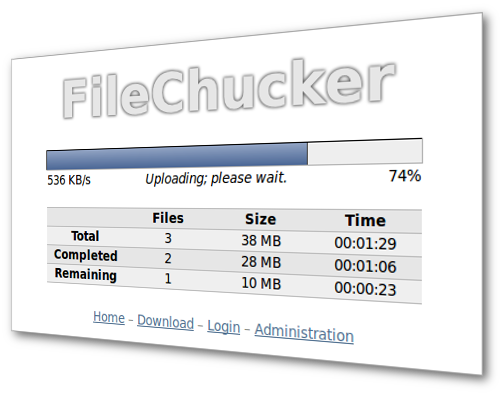
FileChucker is an AJAX-based web application that lets you accept file uploads on your own website. It's simple to install, packed with features, fully configurable, nice looking, and very handy for when you want to share files with anyone, or accept files from anyone. And during uploads FileChucker shows a progress bar & table, so the user knows how much time is left before the upload is complete.
FileChucker can also function as a full-fledged online file manager for your server: it can allow moving/renaming/deleting of uploaded files & folders right in the browser. Of course these features are configurable and password-protectable so you can customize FileChucker however you'd like.
FileChucker works in all major browsers (Firefox, Safari, Google Chrome, IE, Opera), and runs on virtually any server, with no programming required. And it integrates easily into WordPress, Joomla, and any other PHP page, yet it also allows you to upload huge files -- working around PHP's upload size limits -- because it's written in Perl rather than PHP.
Features
- Easy integration with WordPress, Joomla, and any other PHP page on your site
- Works around PHP's upload size limitations, allowing huge uploads on most servers
- Share files that are too large for e-mail by simply uploading them and then sending the link to your friend
- Real-time progress bar and time elapsed/remaining during uploads
- Built-in password protection: two separate passwords allow "admin" and "member" access levels without usernames; or, integrate with UserBase or your site's existing login system
- If you don't want to bother with passwords at all, FileChucker can also be configured to automatically create a private directory for each upload, perfect for single-use uploads; the private directory is optionally re-usable for new uploads by the user who created it
- Integrates with CornerStore so you can quickly and easily sell products and services based on your uploaded files
- E-mail notification of new uploads; can be sent to the webmaster and/or to the person performing the upload
- Create, move, rename, and delete files/folders on your server through the browser, functioning as a web-based FTP system or FTP replacement
- Multiple folders/subfolders for uploads, optionally user-creatable
- Can function as a photo gallery script, with automatic image thumbnailing, image rotation, and a grid-layout display of your photo albums and thumbnails
- Supports custom folder permissions so you can specify read-only or read-write access for users/groups on a per-folder basis
- Can automatically rename all uploaded files to remove any "unfriendly" characters, append a time/datestamp, or rename to a completely custom format that you specify
- Logs information about each upload, like uploader's IP address, hostname, browser & operating system
- You can configure unlimited custom form fields anywhere on the upload form, so your users can enter comments or information about the file(s) they're uploading; supports text fields, radio buttons, checkboxes, drop-down lists
- Can integrate with your site's login framework to store each user's uploads in his own directory automatically, and after an upload, can redirect to a page that you specify
- Restrict what kinds of files can be uploaded and/or displayed based on file extension
- Has a built-in human test to prevent spambot abuse (sometimes called a CAPTCHA system; "CAPTCHA" is (TM) by Carnegie Mellon University)
- Works on a standard server or a secure server (https://)
- Supports i18n and l10n (internationalization and localization) in most areas of the application, so it can be translated into other languages by simply modifying the settings containing the text strings
- Adjustable max upload size (in bytes), up to as large as your server can support (typically multiple gigabytes)
- Adjustable user quotas
- Can upload one or multiple files, up to whatever limit you specify
- Fully customizable via preferences that you can adjust
- Check out the preferences file in the trial version to see all the adjustable features and documentation.
Download
You can download the FileChucker trial version and install it on your site right now. The trial is designed for you to test on your server before purchasing the full version. The trial has limitations compared to the full version; the main limitations are:
- after accepting an upload, it saves the file as an empty document (size 0 bytes) and automatically adds a serial number to the end of the filename.
- only the progress bar itself is shown; progress table, elapsed/remaining time, upload speed, etc, are not shown
- deleting files/folders has been disabled
- creating new folders with the file-manager has been disabled
Prior to version 2.0, FileChucker was free for personal use, but as more and more people use it and request support & new features, it requires more and more of our development time and effort. So we now charge a small fee for use on personal sites.
Purchase
To get the full version of FileChucker, please choose your license type below. Personal licenses are only for non-business websites. The 3- and 10-site licenses are for when you want to install FileChucker on multiple different websites, and they include big discounts! All licenses are lifetime licenses: you pay only once, and it's yours forever. And all licenses include free tech support, free upgrades for 1 year, and discounted upgrades for life.
FileChucker Full Version: |
||
|---|---|---|
1-Website License - Personal |
$19.99 |
|
1-Website License - Business |
$39.99 |
|
3-Website License - Business |
$89.99 |
|
10-Website License - Business |
$249.99 |
|
Instant credit card payments through PayPal. No sign-up required! |
||
FileChucker Installation Service: |
||
|---|---|---|
Let us install it for you. |
$29.99 |
|
Quick Instructions for Most Servers (Apache on Linux, Mac OS X, BSD)
Unzip your filechucker.zip file, and then upload the contents of the www.example.com folder onto your website. Then visit the following address, replacing example.com with your own domain name:
www.example.com/cgi-bin/filechucker.cgi
If that works, then FileChucker is installed properly. You should now read the FAQ.
If nothing works, read the full instructions.
Quick Instructions for Apache-on-Windows Servers
If your server doesn't already have Perl installed, download and install the free ActivePerl. You may need to reboot after installing it. Open a command prompt and type perl -v and if you get some output about Perl and its version info, you should be all set.
If you had to install Perl, you may also want to install the DBD::MySQL Perl module (if you want to use any of FileChucker's optional database-based features), and the MIME::Lite module (if you want to use any of the email features), by opening the Run dialog or a command prompt and then typing ppm install DBD-mysql (or ppm install MIME-Lite). Or you can run just the ppm command by itself to use the graphical installer.
Now follow the regular Apache instructions.
Quick Instructions for IIS-on-Windows Servers
If your server doesn't already have Perl installed, download and install the free ActivePerl. You may need to reboot after installing it. Open a command prompt and type perl -v and if you get some output about Perl and its version info, you should be all set.
If you had to install Perl, you may also want to install the DBD::MySQL Perl module (if you want to use any of FileChucker's optional database-based features), and the MIME::Lite module (if you want to use any of the email features), by opening the Run dialog or a command prompt and then typing ppm install DBD-mysql (or ppm install MIME-Lite). Or you can run just the ppm command by itself to use the graphical installer.
Unzip your filechucker.zip file, then open the www.example.com folder and move the contents of the cgi-bin folder into the upload folder. Then delete the cgi-bin folder. Upload the "upload" folder onto your website, then visit the following address, replacing example.com with your own domain name:
www.example.com/upload/filechucker.cgi
If that works, then FileChucker is installed properly. You should now read the FAQ.
If nothing works, read the full instructions.
Full Instructions for Most Servers (Apache on Linux, Mac OS X, BSD)
Note I: Do not edit the filechucker.cgi file unless absolutely necessary; instead, edit filechucker_prefs.cgi for all your customizations.
Note II: if you are using Windows on your desktop, and when you open the *.cgi file, the lines all appear to be crunched together, try opening it in Wordpad (not Word) instead. In Wordpad, save the file; this should fix the line-endings so the file's contents appear correctly in other editors like Notepad.
On your website:
- First, complete the quick instructions.
- Set the permissions on /cgi-bin/filechucker.cgi (aka, chmod it) to world-readable and world-executable, that is, a+rx or mode 0755. Do NOT use 0777.
- Set the permissions on the /cgi-bin/encdata/ directory to world-readable, -writable, and -executable, that is, a+rwx or mode 0777.
- Set the permissions on the /upload/files/ directory to world-readable, -writable, and -executable, that is, a+rwx or mode 0777.
- Now visit yoursite.com/cgi-bin/filechucker.cgi in your browser and FileChucker should be working properly.
- If you get an Internal Server Error, it's most likely a permissions problem. See this page for more details.
- Read the FAQ.
Now FileChucker is ready to run, and you can access it by going to yoursite.com/cgi-bin/filechucker.cgi (or yoursite.com/upload/ if your server supports it).
Full Instructions for Apache-on-Windows Servers
Note I: Do not edit the filechucker.cgi file unless absolutely necessary; instead, edit filechucker_prefs.cgi for all your customizations.
Note II: if you are using Windows on your desktop, and when you open the *.cgi file, the lines all appear to be crunched together, try opening it in Wordpad (not Word) instead. In Wordpad, save the file; this should fix the line-endings so the file's contents appear correctly in other editors like Notepad.
On your website:
- First, complete the quick instructions.
- Now visit yoursite.com/cgi-bin/filechucker.cgi in your browser and FileChucker should be working properly.
- If it doesn't execute or you get errors, you may need to change the first line of the filechucker.cgi file from #!/usr/bin/perl to either #!perl or #!c:\path\to\perl.exe
- If it doesn't execute or you get errors, you may need to rename the script and its prefs file from a .cgi extension to a .pl extension.
- If you get errors about FileChucker being unable to delete something from the encdata or files folder, you may need to set a "Delete" bit on the folder's properties.
- Read the FAQ.
Now FileChucker is ready to run, and you can access it by going to yoursite.com/cgi-bin/filechucker.cgi (or yoursite.com/upload/ if your server supports it).
Full Instructions for IIS-on-Windows Servers
Note I: Do not edit the filechucker.cgi file unless absolutely necessary; instead, edit filechucker_prefs.cgi for all your customizations.
Note II: if you are using Windows on your desktop, and when you open the *.cgi file, the lines all appear to be crunched together, try opening it in Wordpad (not Word) instead. In Wordpad, save the file; this should fix the line-endings so the file's contents appear correctly in other editors like Notepad.
On your website:
- First, complete the quick instructions.
- Now visit yoursite.com/upload/filechucker.cgi in your browser and FileChucker should be working properly.
-
If it doesn't execute or you get errors, you may need to complete one or more
of the following steps (most are not necessary on most IIS servers, so try one at a time):
Rename the script and its prefs file from a .cgi extension to a .pl extension.
Change the first line of the filechucker.cgi file from #!/usr/bin/perl to either #!perl or #!c:\path\to\perl.exe
For the /upload/encdata and /upload/files folders, do the following: right-click on the folder, choose Properties, and go to the Security tab. Find or add the IUSR_computername account, and give it "Full Control". This account is sometimes called the Internet Guest Account.
Run the inetmgr command and change the CGI web service extension from "prohibited" to "allowed". If your Web Service Extensions list doesn't include an item for Perl CGI scripts, then add a new one (named something like "Perl CGI", or "CGI Scripts", etc -- the name is not important), and for its "Required Files", enter C:\Perl\bin\perl.exe "%s" %s (adjust the path as necessary for your Perl installation)
Run the inetmgr command and right-click on the website and choose Properties. Go to the "Home Directory" tab, then to "Application Settings", and set "Execute permissions" to "Scripts and Executables".
Run the inetmgr command and go to "Application Settings" then "Configuration", and add an application extension for .cgi (and .pl) with the executable set to: C:\Perl\bin\perl.exe "%s" %s (adjust the path as necessary for your Perl installation)
Run the inetmgr command and right-click Default Web Site (or your site's name, if different). Then click New -> Virtual Directory and follow the prompts, entering "upload" as the name of the virtual directory, and choosing FileChucker's upload folder (c:\inetpub\wwwroot\upload\ by default) for the path. For Access Permissions, check (enable) the Read, Run Scripts, and Execute boxes. When finished, right-click the new virtual directory and choose Properties -> Application Configuration -> Mappings, and make sure there's a .cgi (and/or .pl) extension there, mapped to the C:\Perl\bin\perl.exe "%s" %s command (or your server's path to perl.exe).
If you get errors about FileChucker being unable to delete something from the encdata or files folder, you may need to set a "Delete" bit on the folder's properties.
Create the c:\temp\ folder if it does not exist; if this isn't possible, and you get errors or failures when you try to upload files, then set $PREF{disable_upload_hook} = 'yes' in filechucker_prefs.cgi. - (Optional; recommended) You may want to disable directory-listing for your /upload/ directory; you can do this through inetmgr.
- (Optional; recommended) If your server runs PHP, then you should disable it for your /upload/files/ directory, so that visitors can't upload PHP applications and modify the files on your server. (FileChucker does disallow the uploading and listing of dangerous file extensions including .php by default, but disabling PHP execution for your uploads folder will further strengthen your installation's security.)
- (Optional) To increase IIS's CGI timeout, which will prevent large uploads if set to a low value, you need to set the "CGITimeout" metabase value to a large number, like 5000 or 10000 or more. There are several ways to adjust this value. One is to use the Metabase Explorer, from the IIS Resource Kit. Another is to run the inetmgr command, right-click "Local Computer", choose Properties, then check "Enable Direct Metabase Edit"; then edit the file c:\windows\system32\inetsrv\metabase.xml in a text editor (you may need to use Notepad, not Wordpad), find the CGITimeout setting, and change it to a larger value.
-
(Optional) FileChucker's image features (thumbnails, rotation)
require an image-processing library like GD or ImageMagick. To
install the GD Perl module, open a command prompt and run the command
ppm install http://theoryx5.uwinnipeg.ca/ppms/GD.ppd or
ppm install http://cpan.uwinnipeg.ca/PPMPackages/10xx/GD.ppd
one of which should work depending on your version of Windows and ActivePerl.
To install ImageMagick, go to www.imagemagick.org and download & install the binary release for Windows. Then read this FAQ item for instructions on setting $PREF{convert_command}. - Read the FAQ.
Now FileChucker is ready to run, and you can access it by going to yoursite.com/upload/filechucker.cgi (or yoursite.com/upload/ if your server supports it).
Performance
First, it should be noted that FileChucker itself imposes no limits on the amount of data that can be transferred (except whatever limit you specify in your setting for $PREF{sizelimit}). FileChucker also does not place any limit on the speed of an upload. If you are having trouble with uploading large files, or with uploads going really slow, the problem is in your network, or somewhere else in your server's hardware or software configuration. Many FileChucker users on many platforms (Windows, Linux, IIS, Apache, OS X Server) are uploading files sized in the hundreds of megabytes, so the problem is not within FileChucker.
In a test upload of a 700MB file across a 100mbit LAN, the transfer
ran at about 5MB/sec, requiring about 2.5 minutes to complete.
After the actual data-transfer was complete, the server spent ~50 seconds
processing the file (CGI.pm's internal processing) before the script
finished running. (FileChucker now has the ability to avoid this
extra processing time altogether, as long as your server is running
a relatively recent Perl distribution.) The server was a Dell Dimension 1100 desktop
system, with an Intel Celeron 2.53GHz CPU (256 KB cache, 5061.56 bogomips),
512MB RAM, 1GB swap, and a standard 7200RPM ATA IDE disk. The
server was running Apache 2.0.54 with a fairly standard installation.
During the upload, the server's RAM and swap usage did not increase
significantly (probably a few KB or a few tens of KB), because the uploaded file
got streamed to disk (to a temporary file) by CGI.pm. This is
why the server needed to spend ~50 seconds processing the file after
the upload was complete: it was decoding the raw POST data from the temporary
file into the actual final destination file. (Again, FileChucker
no longer needs to do this.)
In a second test upload on the same server as above, a 1.4 gigabyte file took about 5 minutes to upload, and when the data finished transferring, the server spent just under 2 minutes doing POST-processing before the script finished.
The one thing we've seen that's helped to increase performance during file-uploads (aside from faster hardware and/or a faster network link) is to make sure the server has a recent version of the CGI.pm Perl module. In FileChucker, if you enable the debugging PREFs, then visit your server's FileChucker installation in your browser and pass ?debug on the end of the URL, then view the page's source-code, at the bottom you'll see a bunch of debugging information inside of an HTML comment. One of the items near the top of this info is the CGI version that your server is running. The current version is somewhere around 3.20 or greater; if you're in the 2.xx series, or even the low 3.0x series, then upgrading your Perl installation (which will upgrade your CGI.pm module) may give you better performance during uploads.
If you want to upload files larger than 2 gigabytes, then you can't use Apache 1.3.x or 2.0.x. You need to use Apache 2.2.x, as explained on the "New Features in Apache 2.2" page:
Large File Support
httpd is now built with support for files larger than 2GB on modern 32-bit Unix systems. Support for handling >2GB request bodies has also been added.
Support
If you need any help with FileChucker, please complete the following steps in order:
- Make sure you've followed the installation instructions.
- Make sure you've read the FAQ.
- If you're getting an Internal Server Error, read the Internal Server Error page.
- If you're getting errors about missing Perl modules, read the installing Perl modules page.
- The troubleshooting page has some FileChucker-specific solutions that may help.
- If you still need help, you can contact us. Be sure to send us the full URL to the script on your server.
ChangeLog
(Get the latest version!)
v4.90 (20130429):
- New comments feature, allowing visitors to post comments on previously-uploaded files. Useful in situations where you're using FileChucker as a photo album, or for receiving notes from your clients on their uploaded files, or for sending notes to clients regarding their uploaded files, etc. Includes email notification of new comments, and optional admin moderation of new comments. See $PREF{enable_comments}.
- New uploaded_files_dir___admin setting, for rare situations where you've got the normal uploaded_files_dir being set via some kind of user variable, and you want to specify a different directory for admin (non-user) access.
- New admin_user_present setting for when integrating with a third-party login system, as another way to signify admin presence.
- FileChucker can now display in-page preview images for TIFF files, by creating JPG previews of them, since most browsers can't display the TIFF format.
v4.89 (20130129):
- The $PREF{encodable_app_template_file} feature no longer requires that you put the %%css%% and %%js%% variables in your template file; we'll just automatically insert our CSS and JS either right after the <head> tag, or right before the </head> tag.
- New $PREF{force_nocache_on_all_output} setting, required only on rare goofy servers that automatically cache our app output on the *server* side.
- New code to block potential XSS attacks.
- Bugfix: formfields excluded from the upload form via the $PREF{formfield_NN_only_for_these_groups} setting were still being included in notification emails; now they're excluded there too.
v4.88 (20120919):
- New $PREF{use_NetSMTP_for_email} setting, needed only for a small percentage of (cranky) email servers.
- For upload notification emails, you can now specify a Reply-To address, in addition to a From address.
- If you're using the $PREF{encodable_app_template_file} feature (which is basically an alternate way to do an embed), you can use the new $PREF{encodable_app_template_replacement_001} settings to specify text to be replaced within the template file, e.g. replacing a standard header image with a different one for each logged-in user.
- New rawname URL variable for the Upload Complete page (and stored in the upload info table if enabled), to access the filename as submitted before we applied any of your specified modifications.
- New $PREF{email_link_on_options_menu___folder} setting, to easily email a link to any folder on your download page.
v4.87 (20120806):
- New multi-item move feature: heretofore you could only move files and folders one at a time; now you can use the checkboxes and the Actions Menu at the bottom of the downloads page to move multiple files/folders at the same time.
- New $PREF{preview_videos_in_viewer_mode} setting, so that in the preview/slideshow viewer, where images are shown as web-sized versions with links to the full version, videos are now shown the same way (as opposed to just showing a link to the video file, as we do for non-previewable file types like text files).
- New $PREF{enable_username_from_cgi_script} feature.
- New $PREF{title_text} setting to specify the title that appears in places where HTML isn't allowed, such as the browser's title bar.
- New settings $PREF{file_upload_field_N_is_required} (where N is 2, 3, 4, etc) for installations with multiple required file fields.
- New setting $PREF{disable_upload_iframe_for_these_user_agents}, to work around bugs in particular browsers.
- For drop-down form fields populated from SQL queries, the allowed query format is more flexible (e.g. allowing SELECT DISTINCT in addition to just SELECT).
- New $PREF{formfield_NN_maxlength} feature, to limit the length of input values in single-line form fields.
- New $PREF{hide_filenames_in_filelist} feature, used for example when all your uploaded files are images or videos and thus will have thumbnails, and you want just that small image displayed with no text.
- New $PREF{hide_parent_folder_link_in_file_list} setting.
- Removed all the old style/theme code, CSS, and prefs (e.g. $PREF{light___filelist_row_hover_bgcolor}) in favor of a new simpler system with just two themes: light and dark.
- Removed the $PREF{enable_individual_item_viewer_mode} setting (it had actually been ignored since v4.66 in favor of the new file_links_in_ settings in that version).
- New $PREF{database_tablename_prefix} setting (defaults to "fc_"), for sites with multiple FileChucker installations where you want to use separate database tables for each one.
- Renamed $PREF{file_and_dir_info_table} to $PREF{pathinfo_table}, and changed its default value from "file_and_dir_info" to "pathinfo".
- New $PREF{extra_sql_safe_characters} setting, in case you want to allow other characters to be stored in your database than the ASCII ones that FileChucker allows by default.
- New $PREF{static_error_message} setting, in case (after you've got FileChucker all installed and configured) you want any error to display a simple static message (e.g. "Server Error") instead of a detailed error message.
- New $PREF{server_handles_ip_addresses_incorrectly} setting, for servers that don't provide accurate/consistent identification of client IP addresses via environment variables. This is unnecessary on 99% of servers, and it only affects certain error/confirmation messages that the app generates: normally we restrict these based on logged-in status, or IP address, but with this setting enabled, we'll allow the message to be shown with no restriction, but we'll also auto-expire it quickly to minimize the (already remote) chance that the message could be viewed by someone other than the visitor who generated it.
- New $PREF{always_show_details_for_move_and_copy_operations} setting: normally we only display a results page for these operations if an error occurs, but with this setting we'll show the list of items successfully moved/copied.
- Various CSS tweaks.
- Reorganized some of the sections at the end of the prefs file.
- We now support the Digest::SHA module, in addition to Digest::SHA1, for servers where the latter isn't installed.
- New %QS hash to allow you to use variables from the URL's query-string within your prefs file (e.g. "%QS{foo}" will turn into "bar" if ?foo=bar is passed on the URL).
- We now specify accept-charset="UTF-8" on our <form>s, which should resolve some internationalization issues.
v4.86 (20120416):
- Simplified the embedding process so that the $PREF{print_full_html_tags} setting is no longer required. Now when FileChucker is embedded within a different page, the full filechucker.cgi URL will continue to work properly as well.
v4.85 (20120404):
- Now supports integration with CornerStore, so you can easily sell products and services based on the uploaded files in FileChucker.
- Prefs added:
groups_allowed_to_view_buy_links_db
groups_allowed_to_edit_buy_links
groups_allowed_to_create_buy_links
groups_allowed_to_delete_buy_links
integrate_with_cornerstore
show_buy_column_in_filelist
cornerstore_cgi_location
cornerstore_buy_link_separator
cornerstore_item_table_list
cornerstore_buy_link
file_and_dir_info_table
v4.84 (20120325):
- For uploads containing multiple files and per-file form fields, there is now a link to auto-fill the form fields using the values from the fields on the previous file.
- We now use accept-charset="UTF-8" on the upload form, which should allow unicode characters in form fields to be processed correctly.
- Replaced $PREF{path_to_filelist_images} with $PREF{app_images_url} for standardization across multiple apps.
- When server write-caching prevents the upload progress bar from working properly, the message displayed is more end-user friendly.
- New $PREF{static_error_message} setting, in case you want to hide all real error messages and show a more generic/short/friendly error instead.
- New $PREF{always_use_nonforking_code_when_sending_email} setting, which can help work around email issues on screwy servers.
- Bugfix: sometimes a spurious "couldn't rmdir (delete) directory" would be displayed (when FileChucker was cleaning up old files/folders) because of the way we were checking for empty directories.
- Bugfix: when using the custom folder permissions feature, any permissions set on the very top level (/) would fail to show up as inherited permissions when viewing the levels below it (though the actual permissions were still enforced correctly).
-
Prefs added:
app_images_url
always_use_nonforking_code_when_sending_email
static_error_message -
Prefs removed:
path_to_filelist_images
v4.83 (20120130):
- New $PREF{extra_header_output} to allow you to include a custom favicon, or to integrate with VisitorLog, etc.
- You can now pass ?dirlist=foo on the URL to the upload page, to hide any folders in the "Upload to:" drop-down field (if enabled) that don't match foo.
- New $PREF{enable_username_from_environment_variable} feature, which is just what it sounds like, for integration with non-UserBase login systems.
- New $PREF{subgroup_*} settings (see below) to enable more fine-grained control over folder permissions when using UserBase's subgroup manager feature.
- When using $PREF{store_upload_info_in_database}, there are now two new fields stored by default: rawname and extension. rawname is the original filename from the client, before any serialization or $PREF{reformat_filenames_for_all_uploads} options, etc, are applied.
- New $PREF{debuglog} setting to make debugging easier, especially on servers without decent built-in error logs, or where the host won't let you access the error log.
- Bugfix: if you added more than 99 form fields to the upload form, only the first 99 would work properly.
-
Prefs added:
enable_username_from_environment_variable
username_envvar_name
subgroup_owned_users_have_same_folder_perms_as_their_subgroup_manager
subgroup_owned_users_can_read_the_userdir_of_their_subgroup_manager
subgroup_owned_users_can_write_the_userdir_of_their_subgroup_manager
hide_toplevel_userdir_shortcut_for_subgroup_owned_users
extra_header_output
debuglog
v4.82 (20111026):
- New $PREF{show_myaccount_link} setting for when integrated with UserBase; this is in addition to $PREF{show_login_link}, which is now a dedicated login/logout link (in previous versions, it changed to a My Account link when integrated with UB).
v4.81 (20111026):
- New method for detecting when the upload is complete in the iframe, which eliminates a ~1-2 second delay at the end of uploads before the Upload Complete message is displayed, and which also allows us to detect and display any server errors that occur during an upload.
- We now cache any environment variables received from PHP, so that we're able to use them during POSTs (e.g. uploads).
- The get_userdir_from_username and get_userdir_from_email prefs have been replaced by enable_userdir_from_login_system and userdir_template, which now also supports including the user's email address and user ID within the userdir value.
- New $PREF{uploadbutton_id} setting, for situations where you're integrating with an existing complex form where it'd be a hassle to change the CSS ID of the upload button, so you can adjust it in FileChucker instead.
- New $PREF{ignore_image_resizing_errors} setting, to suppress errors during thumbnail generation, which, on a server with a properly-functioning image module/library, are generally only caused by the occasional corrupt image file, which we can't do anything about anyway, so displaying an error is largely pointless.
- New $PREF{css_shared} setting, for CSS that is common to multiple Encodable apps.
- Bugfix: on some servers, small uploads and/or slow connections result in the write-caching error being displayed when it doesn't actually apply, so we now wait until we're at least a few seconds into the upload before displaying it.
- Bugfix: on some servers, at the end of an upload, the upload size would appear to revert to a very small value, causing the time displays on the upload progress table to freak out; we now ignore any decreasing values for the size, so this issue no longer occurs.
- Bugfix: with custom folder permissions enabled, viewing the permissions would result in an error on Windows servers.
-
Prefs added:
enable_userdir_from_login_system
userdir_template
uploadbutton_id
ignore_image_resizing_errors
css_shared -
Prefs removed:
get_userdir_from_username
get_userdir_from_email
v4.80 (20111006):
- Bugfix: when using the human test (aka CAPTCHA) feature, we'd eventually display an error when auto-deleting the old human test images, because of an incomplete directory check.
v4.79 (20111005):
- Bugfix: when deleting a directory, we would display a MySQL error if custom folder permissions were not enabled.
v4.78 (20110929):
- We now include the version number in the prefs file too, to make things easier for those with multiple installations, and during updates/moves, etc.
v4.77 (20110901):
- Changelog coming soon.
v4.76 (20110715):
- Changelog coming soon.
v4.75 (20110609):
- New $PREF{show_keep_me_logged_in_checkbox_on_login_page} setting, in case you want to disable that checkbox, which was previously always shown.
- New $PREF{ignore_chosen_subdir_during_upload_if_new_subdir_entered} setting, for situations where you want any new subdirs to be forced into the top level, instead of inside an existing subdir.
- Bugfix: we were failing to store upload info into the database for file-less form submissions (if both of those option were enabled).
v4.74 (20110501):
- Changelog coming soon.
v4.73 (20110326):
- Changelog coming soon.
v4.72 (20110321):
- Bugfix: when integrated with UserBase, and pulling the login_url value from the UserBase prefs file, we'd set it to the wrong value if it was still set to the default of $ENV{SCRIPT_NAME} (setting it to filechucker.cgi instead of userbase.cgi).
v4.71 (20110319):
- Bugfix: the pagination links on the filelist page were supposed to be hidden when they weren't needed (i.e. when the number of items is less than your num-items-per-page setting), but that wasn't happening.
- Bugfix: the filelist page was displaying a "Buy" header (which is part of an upcoming feature still under development) when it shouldn't have been.
v4.70 (20110313):
- When integrated with UserBase, FileChucker can now set its own login_url pref from UserBase's prefs file.
- More changelog items coming soon.
v4.69 (20110126):
- We now reject form submissions without files (unless you've specified to allow such submissions) on the server-side as well as the client side, to stop spambots that POST directly to the script without using the frontend.
- Bugfix: a change in the previous version contained a bug that resulted in spurious permissions errors when not using custom folder permissions.
v4.68 (20110123):
- Changelog coming soon.
v4.67 (20101231):
- Changelog coming soon.